

Info Window · The Ettenmoors at a glance
Map
A living tactical map: keep ownership, gates, sightings, port points and the Drake.
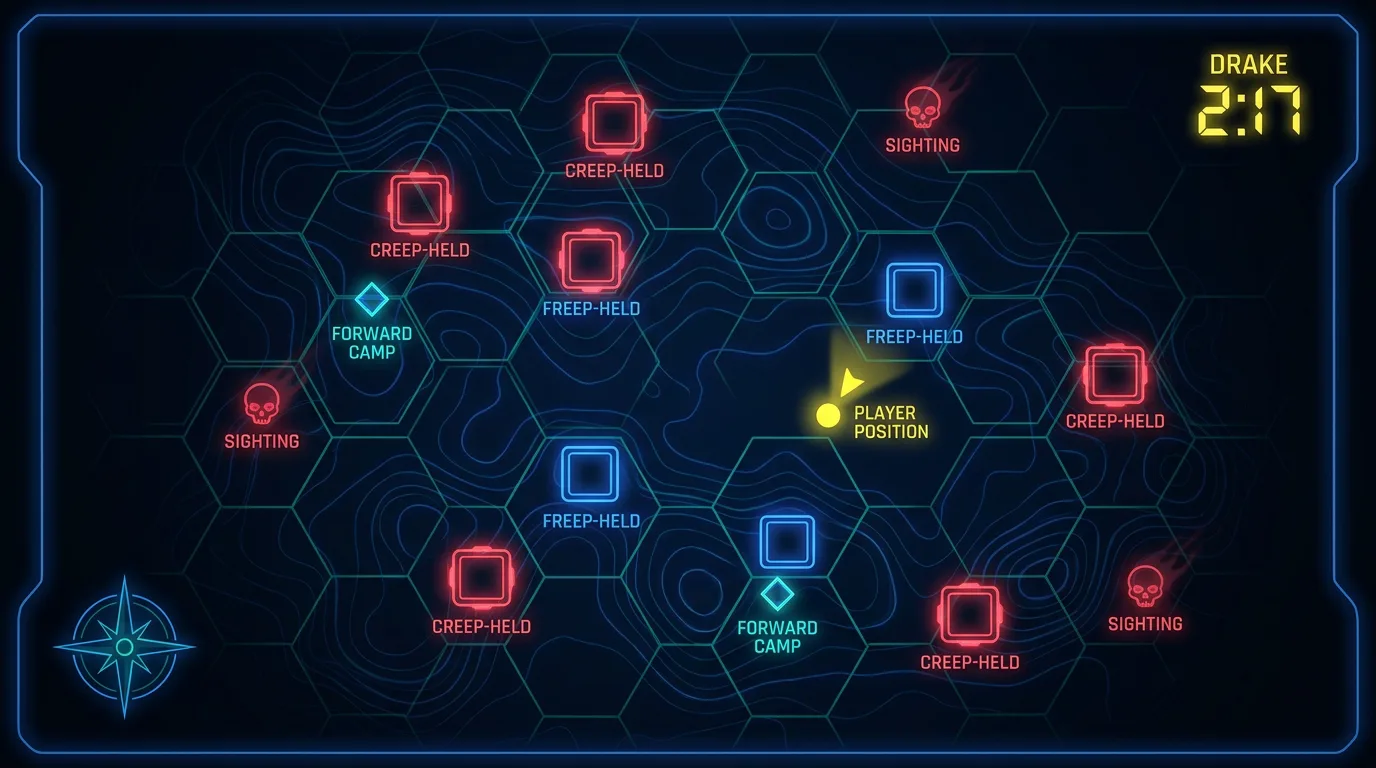
What it does
The Map turns a thin position widget into a rich Moors situation board. Click a keep, outpost or port point to travel like PvMP+ does; see who owns what in creep-red / freep-blue with rotation timestamps; track reinforced gates and forward camps; watch fading Freep sightings called out by your raid; and drop a rally point that broadcasts to everyone.
Anatomy
Clickable markers
Keeps, outposts, Drake and port points — click to travel; colored by faction.
Rotation times
Each keep/outpost shows when it last changed hands (from yellow-text events).
Gates & camps
Reinforced-gate and forward-camp status for Tír Glendúr & Lugazag, with manual toggles.
Sightings
Freep call-outs from chat, kept ~15 min, fading with age, deduplicated across players.
Rally point
Leaders click the map to set a rally point → broadcast + alert + icon for the raid.
Details
- Relic status shown at Dargazagh and Ost Ringdyr.
- Bonus % and Outnumbered, mirrored from the Status window.
- A /loc button drops a raid marker at your own position.
- Distance-to-travel-time readout, and area shading for who holds which ground.
- Free drag-resize instead of fixed presets.