

HUD · Rank · Infamy · World
Status
Your rank, infamy progress, world bonuses and the Drake timer — the between-fights panel.
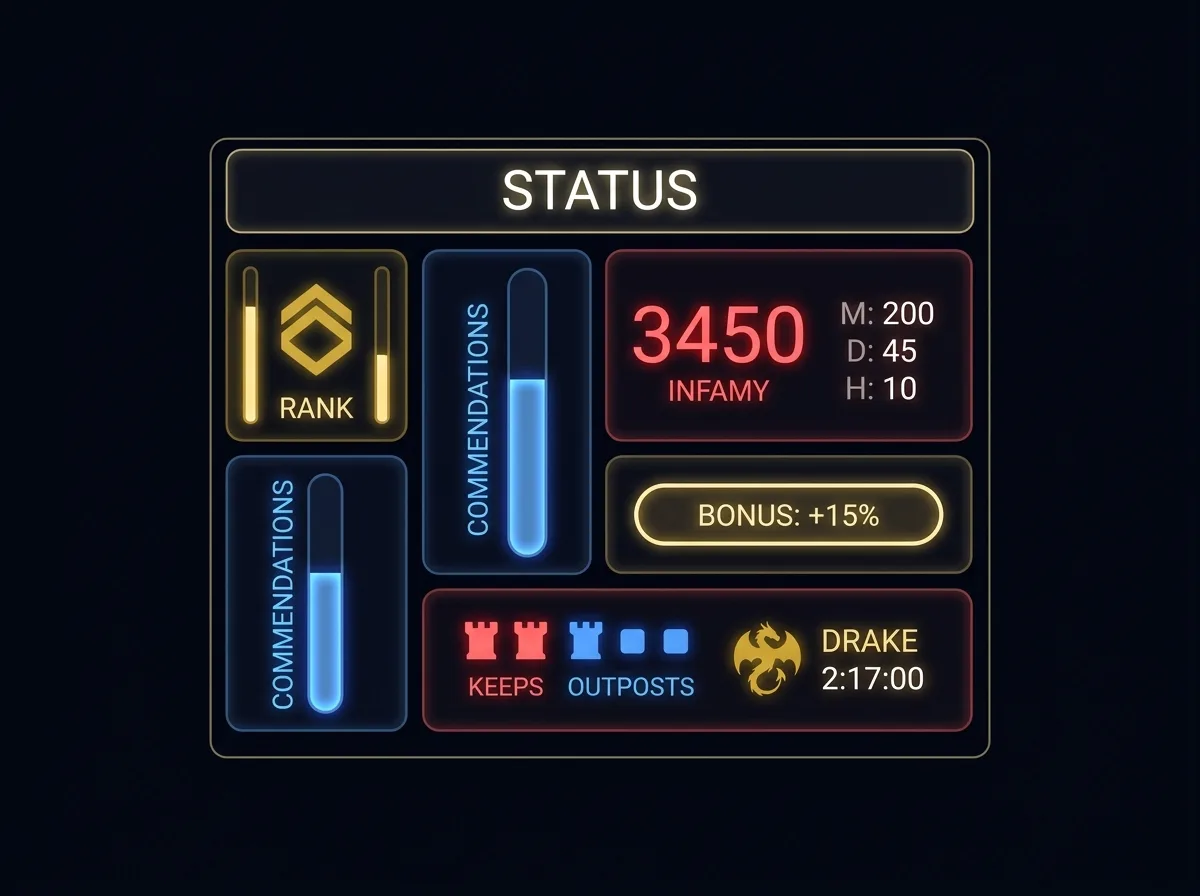
What it does
Status is the slow-changing companion to the combat-intense Dashboard. It mirrors what PvMP+ shows — rank icon with a progress bar to the next rank, commendations, infamy across several time windows, your bonus percentage with a breakdown, keep and outpost control, and the Isengard Drake timer. Glance at it between fights to know where you stand.
Anatomy
Rank & progress
Rank icon and class icon with a vertical bar filling toward the next rank threshold.
Infamy windows
Total infamy (click → “to next rank”), plus this month / day / last hour / last fight.
Bonus %
Your current world-bonus modifier with a hover breakdown (keeps, outposts, relics, outnumbered, store).
Keep / OP icons
Control of keeps and outposts shown in creep-red / freep-blue.
Drake timer
Countdown with a manual set-time button and auto-start; colored by which side currently holds the Drake.
Details
- Commendations shown as a vertical fill, synced from your wallet.
- A commendations “crash-check” at login re-asks infamy/kills if the stored value drifts.
- Outnumbered buff for your own side is surfaced explicitly.
- Send-to-chat button posts your infamy line; a settings button picks which values go out.
- Reaching a rank threshold fires a golden congratulations alert.
- Heap (KB/MB) and frame-lag (ms) shown numerically — the companion to the Dashboard monitor bars.