 CombatDash
The Stats window contains the main tabs Fights, Statistics and Daily Stats.
Fights
The Fights tab shows a compact report for one saved fight. Use the fight selector or arrows to move through the session history.
The report shows:
- DPS, INC, HPS, OUT, and peak eDPS
- peak DPS and largest incoming burst
- tactical and physical damage shares
- your deaths and revives
- observed deaths and revives for both sides
- top lists for attackers, targets, healed players, and healers
Fights contains two views for the selected fight. The statistics view shows aggregate values and top lists. The line graph overlays time series such as DPS, INC, HPS, OUT, and morale and marks events such as deaths and revives. Use the colored controls to toggle each stream.
Fight navigation is separate from Dashboard navigation. Selecting a fight in Stats does not change the live Dashboard.
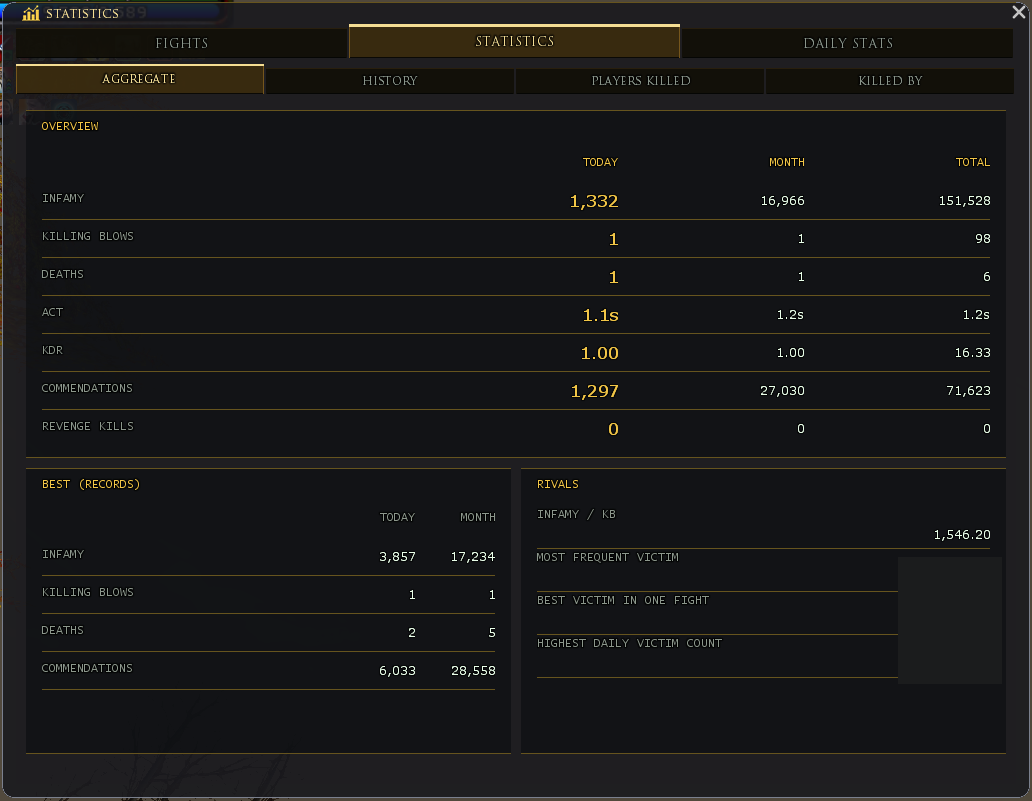
Statistics: Aggregate
Aggregate compares Today, Month, and Total. Values include infamy, killing blows, deaths, and commendations.
Derived values show infamy per killing blow and killing blows per death. Records and kill series add more context.
Statistics: Players Killed
This tab counts players on whom you scored a confirmed killing blow. You can search and sort by name or count.
Statistics: Killed By
This tab counts players who scored the killing blow on you. The list also supports search and sorting.
Understanding combat data
CombatDash starts a fight from your combat state and identified combat entries. It does not save very short events or isolated DoT and HoT tails as separate fights.
CombatDash waits briefly for late events after combat. It can merge fights within a small time window. You can change history size, grace time, and merge time.
Average and live values
DPS, INC, HPS, and OUT are average rates over active fight time. Smaller secondary values can use a short live window.
eDPS is a smoothed live value for the current target. It is not a subset of your personal DPS.
TTL uses a short current window. It therefore changes faster than the average combat cards.
Live and history
The Dashboard can show LIVE, LAST, or an older history entry. A new fight returns the Dashboard to LIVE automatically.
Stats has a separate fight selector. Its selection does not affect the Dashboard.
Fight history exists only for the current plugin session. Reloading the plugin or logging out clears it.
Daily Stats: compare recorded days
Open Statistics → Daily Stats to compare recorded days. Choose year, month and day, or use Today and the arrows for recorded days. Total offers Records or Totals. Rates and single hits remain maxima; they are not added. Damage and healing include NPC combat. A dash means “not recorded”, not zero. The first day can be partial. Recording starts when CombatDash collects the data; earlier game days are not reconstructed.