 CombatDash
First, extract the Gorkasch folder into your LOTRO plugins folder.
The usual plugin path on Windows is:
Documents\The Lord of the Rings Online\Plugins\
You can then load CombatDash in two ways.
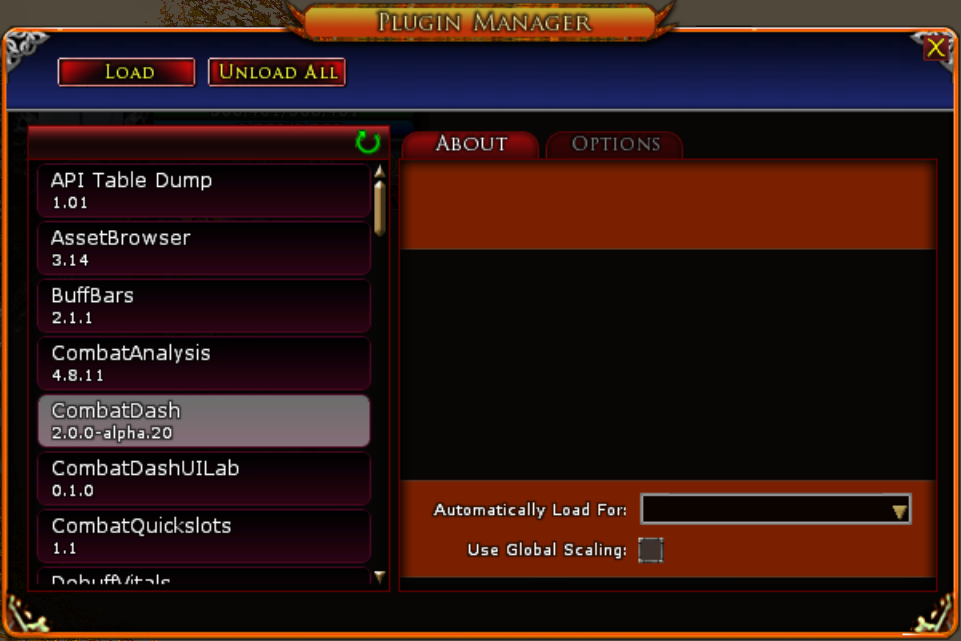
Plugin Manager
- Enter
/plugins managerin chat. - Select CombatDash in the list.
- Select Load.
- Enable automatic loading for this character if required.
Chat commands
Enter /plugins load CombatDash in chat. If the plugin is not listed after a new installation, open the Plugin Manager and check the installation path first.
These commands apply to the English LOTRO client. Other client languages can use localized plugin commands.
CombatDash v2.0 Alpha supports Creep characters only.
Updating without losing data
Unload CombatDash before replacing plugin files. Extract the current ZIP so Gorkasch/CombatDash.plugin sits directly below your Plugins directory. Map tiles are included; no extra map pack is needed. Keep PluginData and other plugins in Gorkasch. Then reload CombatDash on a Creep.
This guide describes the 2.0.0-alpha.18 development baseline plus the corrections listed as Unreleased in the change log. A downloaded ZIP may not contain every local correction. Check its version message and package notes.
Adjust size inside CombatDash. Leave LOTRO global plugin scaling disabled to avoid combining two scaling systems.