 CombatDash
Setup wizard
CombatDash opens a three-step wizard on the first start. The Dashboard and other windows remain closed at first:
- The welcome page explains the Radial Menu, Dashboard, and HUD.
- CombatDash checks your character and shows class-specific settings.
- You adjust the window and HUD percentages separately and configure Mouse Finder.
Known food, buff potions and cures in your bags are assigned automatically when CombatDash starts. Inventory changes update the links; a check every 30 seconds catches missed changes. If a stack runs out, restock the same item: your selection stays saved and reconnects. To choose another variant or add a class skill, open Options > Buffs or Cures and drag it into the matching slot. Removing a link keeps that item or buff unassigned until you add it manually. Items are used only when you click their shortcuts.
On Orcrist, the bundled player starter set is enabled by default. The first click on Continue runs /loc to detect the server. The import adds only missing names, sides, and classes. It never replaces existing local data.
You can enter your current infamy and killing blows on the character page. CombatDash needs these starting values because the LOTRO API does not provide both totals.
You can change all values later in CombatDash Options. Open Options from the cogwheel or double-click the center of the Radial Menu. Use /cd wizard to run the wizard again.
First look
The wizard hands control to the Radial Menu when setup is complete. Click a segment to open its window. You can keep multiple windows open.
A thin gold progress strip can appear briefly during loading. CombatDash is already usable while it prepares HUD graphics in the background.
Start with readable controls and keep your settings
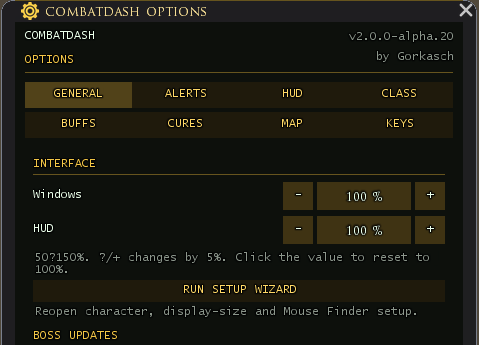
Start at 100 percent for Windows and HUD. Under Options → General → Interface, adjust them independently between 50 and 150 percent. The former Normal and 4K profiles are gone. After a change, check numbers, icons and clickable areas; not every window and class combination has complete in-game qualification yet.
The wizard has three pages. Buffs and Cures no longer need separate setup pages. Open their Options sections later when you want to change an assignment.
If CombatDash reports a settings load or migration failure, changes made in that session are not saved, including during unload. Before migrating an older format it creates CombatDash_migrationBackup. Keep the original and backup for troubleshooting. A newer, unsupported data format is not overwritten.
A shared settings template for new characters is planned but not available. The existing server-scoped Player Registry is separate from that plan.