 CombatDash
Relationship to the HUD
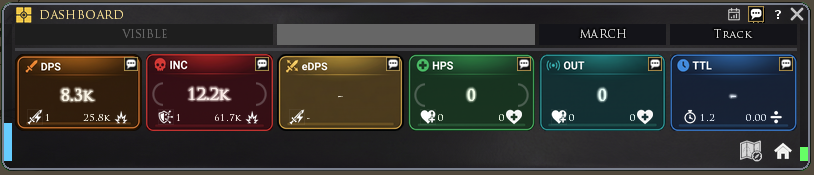
The Dashboard uses the same six main metrics and, where possible, the same class and combat states as the HUD. It is the compact window view for players who prefer a conventional panel or want to use it alongside the HUD.
The Dashboard shows six combat cards:
| Card | Meaning |
|---|---|
| DPS | Your average outgoing damage per second during the fight |
| eDPS | The smoothed morale loss per second of your current target |
| INC | Your average incoming damage per second |
| HPS | Healing per second received by you |
| OUT | Healing per second done by you |
| TTL | Estimated survival time at the current net damage rate |
eDPS measures the morale change of your current target. It includes visible pressure from all attackers. Incoming healing on the target reduces the value. The card needs a short warm-up after a target switch.
TTL uses your current morale and recent net incoming damage. Strong healing, damage spikes, and short samples can change it quickly. TTL is a warning aid, not a guaranteed death prediction.
The smaller card values provide more information. Examples include maximum hits, active attackers, active healers, healed targets, deaths, and confirmed kills. During combat, attacker and healer counts are live. After combat, their peak values remain visible.
Click DPS, INC, HPS, or OUT to open available details. The detail view can show normal, critical, and devastating events plus top sources or targets.
The Dashboard also shows class-specific states. Examples include Stealth, Bubble, Dying Rage, Execute, Revenge, Rage Ready, and Power of Fear. Your Creep class determines which elements appear.
The thin side bars monitor frame gaps and Lua heap growth. Move the pointer over a bar to see details.
The SEND Quickslot in the title band shares a summary of all performance values. CombatDash selects Group for a fellowship and Raid for a raid. Right-click to override the channel temporarily. CombatDash returns to automatic routing after the next fellowship-to-raid or raid-to-fellowship change.
Under Options → HUD, you can make the Dashboard collapse to its title and buttons while the HUD is active.
Separate current danger from earlier fights
For the live fight, the TTL number uses the same survival colours as the HUD. It stays neutral while you inspect an older fight, so a historical value cannot be mistaken for current danger. The morale forecast itself belongs to both HUD morale arcs.
Hover the narrow MEM and LAT bars to inspect memory growth or timer delays. Both use the same samples as the HUD. LAT is not ping, and MEM is not total game RAM.
Resize the Dashboard with the Windows percentage in Options. The separate HUD percentage does not change this window.
Compare observed deaths
The narrow red-and-blue battle bar compares observed deaths in the current fight. A larger red share means more Freeps died; a larger blue share means more Creeps died. Revivals are recorded separately and never subtract a death. Unknown factions do not count. This is not a complete tally for the whole map.