 CombatDash
The LOTRO Plugin API provides only a character's name and current morale and power. It does not provide the side or class. CombatDash therefore cannot directly identify whether a target is a Freep or Creep, or which class that player uses.
Many CombatDash features need this information. Target management, enemy lists, class displays, and statistics must know a player's side and class.
CombatDash therefore uses the player model, internally also called the World model. It analyses combat skills and other unambiguous combat events to add the missing data when a reliable classification is possible. Unclear cases remain Unknown.
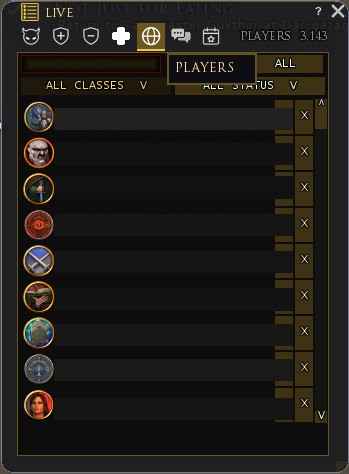
The Player Registry is the visible, server-specific database for this model. Open it through LIVE → PLAYERS.
CombatDash can learn an entry from several sources:
- the current or previous target
- combat skills with a unique class mapping
- CombatDash messages from other players
- manual classification by right-clicking the player icon in a CombatDash window
Automatic skill detection now also includes unambiguous Brawler and Mariner skills. Ambiguous or unverified labels intentionally remain Unknown.
You can classify an unknown player manually at any time. Right-click the player's icon in a CombatDash window. Select Freep or Creep, then select the class. A manual classification corrects the current data. Later unique combat skills can correct side and class again.
A player can be a Freep, Creep, or Unknown. An entry can also have a class, a personal status, or a non-player type.
Status and level
Status and level are personal ratings that you maintain manually. Status can mark VIP targets, arch enemies, kinship members, friends, or known Freeps playing a Creep. Levels from 1 to 5 provide your own assessment of a player. Both values are separate from automatically identified class and side.
Open a player's context menu to set a status or level. Supported player displays show these values as a ring and stars. CombatDash does not infer personal ratings from gameplay.
Search and filters
The first toolbar row contains search, sorting, and the side filter. The second row filters by class and personal status.
Available status markers depend on the side. Examples include VIP Target, Arch Enemy, Kinship, Friend/Ally, and Freep on a Creep.
Edit an entry
Right-click an entry to open the classification menu. First select Freep, Creep, or Other. You can then select a class or non-player type.
Other contains Unknown, Pet, Freep NPC, and Creep NPC. These types help remove false players from other lists.
Double-click an entry to open its Player Card. Direct buttons mark a favorite or delete the entry.
Player Card
The Player Card shows side, class, personal status, and the manually maintained PvMP rank. It also compares your confirmed kills against that player and that player's kills against you for Today and Total. The lower area shows when you last saw the player and an active revenge window.
Only rank is editable on the card. LOTRO does not expose a foreign player's rank through the plugin API.
Storage
CombatDash stores the Player Registry per account and server. All CombatDash characters on the same account and server share the entries.
The database has size and age limits. CombatDash can later remove very old or low-value entries.
Import and export
Open Options → General → Player Registry Data to export or import data. Export creates a server-specific CombatDashWorldShare.plugindata file.
The recipient copies this file into the matching PluginData folder and starts the import. Import adds and updates entries. It does not blindly replace the complete local database.
Import and export are unavailable during combat. You can exclude personal status information from the exchange.
After loading and when sharing data
After reloading, open LIVE → Players and search for a known name. PluginData delivers the registry asynchronously. Data that has not arrived yet is not an empty database. If loading fails, CombatDash blocks registry saves so an incomplete set cannot replace the existing file. Keep the files and report the chat message instead of deleting the data.
Sharing still uses the export file. A pasteable text code for Discord is not available. Personal ratings are not facts confirmed by the game. When exporting, decide whether to include them.