 CombatDash
The Target Manager collects relevant players while you fight and switch targets. It combines target switching, player classification, and the Kill Countdown.
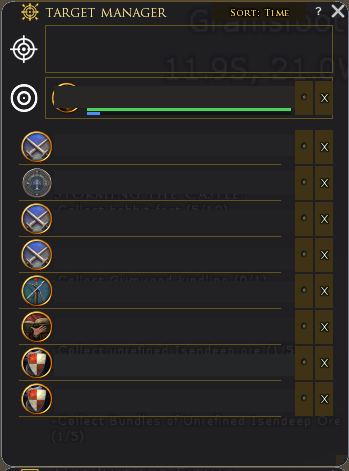
Automatic target order
As soon as you target a player, CombatDash shows them as the current TARGET. On the next target change, the previous valid enemy automatically becomes the secondary target. You can lock this secondary target so further target changes do not replace it.
Observed targets also appear in the list. Favourites always remain at the top. You can keep up to ten favourites at the same time, and CombatDash stores them across restarts. If a favourite is nearby and LOTRO exposes a valid object, the row shows that player's morale and power.
Clicking a target row attempts to target that player again. This works only while LOTRO still knows the target object and range and line of sight permit the action.
The top row shows:
- TARGET for the current target
- SWITCH for the previous target
Click a saved target entry to attempt to target that player again. The Pin button keeps the SWITCH entry while you select other targets.
The live TARGET row can also show a Creep or an unresolved player. SWITCH and the retained list still contain confirmed Freeps only.
The All, Freep, Creep, and Unknown filters limit the retained list. They do not hide the current target. You can sort the available entries.
For each entry, you can:
- set the side and class
- mark the player as a favorite
- open the Player Card
- delete the entry
The KILL button creates a Kill Countdown for the group or raid. Right-click to select the channel. LOTRO still requires a manual Quickslot click.
Limitations
CombatDash cannot safely retarget every player. Range, line of sight, and the lifetime of the internal target object affect this action.
CombatDash filters NPCs and your character where possible. Mark incorrect entries as pets or NPCs in the Player Registry.