 CombatDash
The Commands window contains prepared group and raid commands. It groups them into movement, combat, and organization.
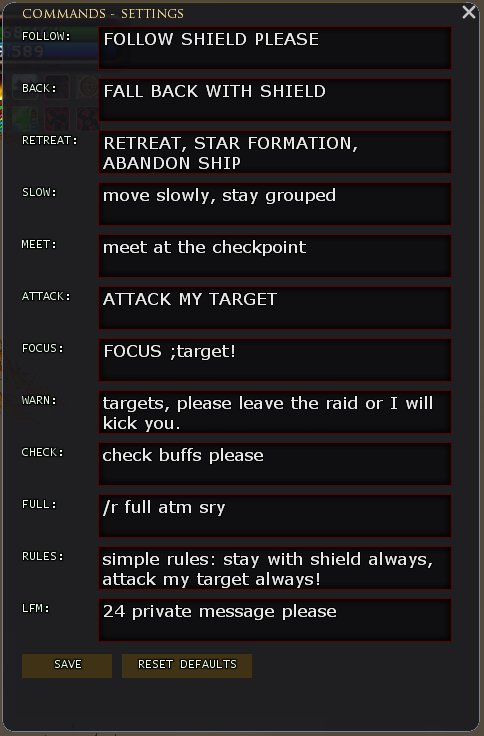
Default commands include:
- Follow and Fall Back
- Retreat and Move Slowly
- Attack and Focus Target
- Buff Check and Raid Rules
- Group Full and LFM
- Cheer and Point
Each chat command uses a LOTRO Quickslot. Your click sends the text. CombatDash does not send the message itself.
The global mode switches between Raid and Group. Right-click can override the channel of one button. The configuration supports custom text and a custom LFM group size.
The window supports horizontal and vertical layouts. CombatDash saves the selected orientation.
Group and raid
| Command | Function |
|---|---|
/cd raid |
Print raid command help |
/cd raid perf open |
Open Performance |
/cd raid perf heal |
Select the HEAL tab |
/cd raid perf damage |
Select the DAMAGE tab |
/cd raid cmd open |
Open the Commands window |
/cd raid cmd config |
Open the command configuration |
CombatDash has additional developer commands. They do not belong in the normal user documentation.